

Merchandising software is only as good as the data it receives and sends back.
If your teams have to re-key product data, re-import the assortment by hand and copy planograms into the replenishment tool, the software becomes one more silo: people spend more time feeding the tool than making decisions.
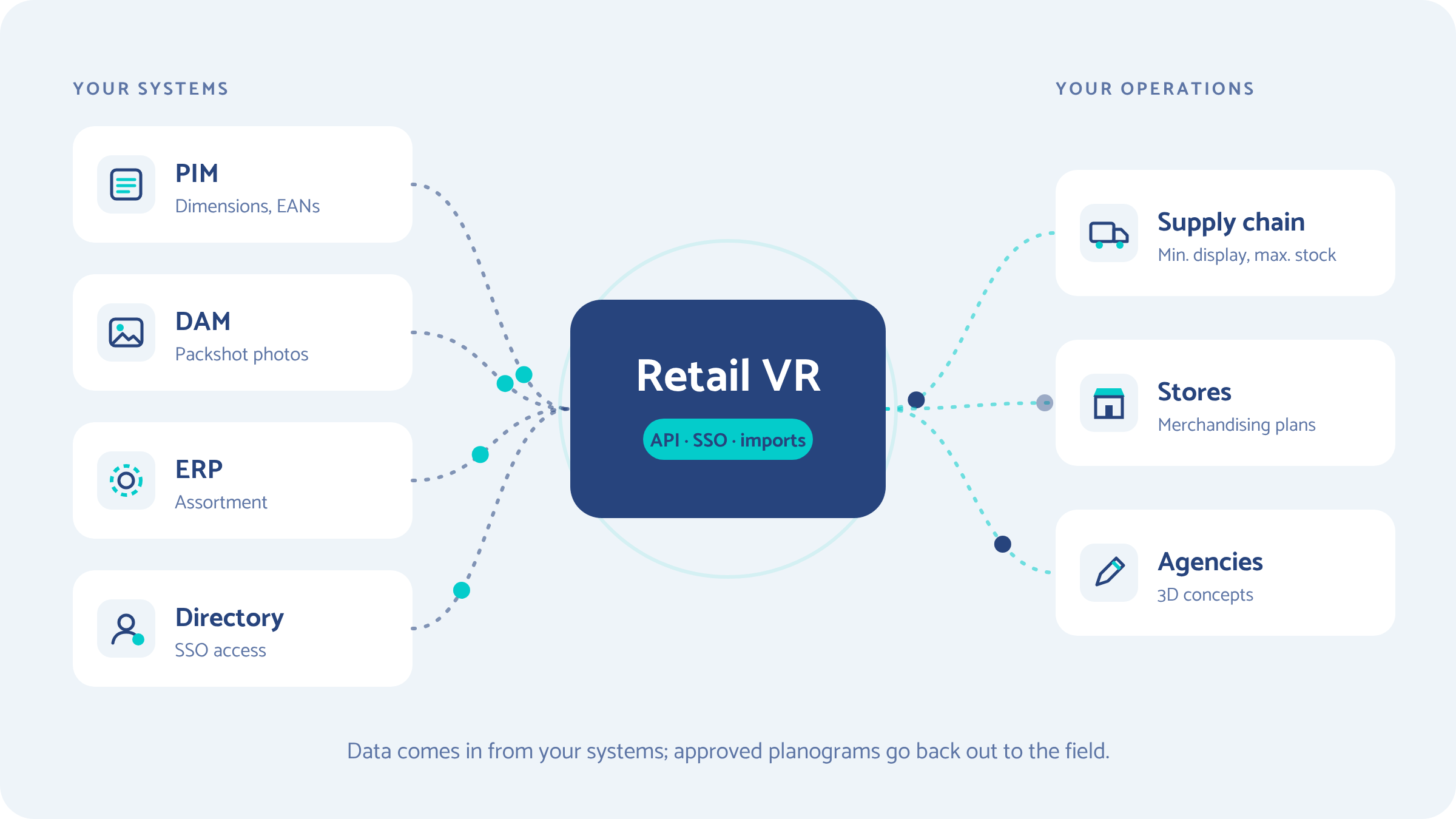
At Retail VR, we made an architectural choice: connect to your existing IT systems (PIM, DAM, ERP, SSO) through APIs, while staying open to manual imports and industry-standard formats. Here is what that changes in practice, and the questions to ask any vendor before you sign.
Why integration matters more than features
A stand-alone tool creates work instead of removing it. Companies have never run so many applications, and most of them don't talk to each other.
Take a situation every category management team knows. A new range is coming in: dimensions and EANs sit in the PIM, images in the DAM, assortment by cluster in the ERP.
Without a connection, someone exports three Excel files, stitches them together, fixes the wrongly entered dimensions, then builds the planogram. By the time it is finally approved, the assortment has already changed.
The Gartner figure should be read with care: it comes from a 2020 survey in which companies estimated their own losses. But it makes one point clearly: poorly managed product data is expensive, and every manual re-entry is a chance for error.
What Retail VR exchanges with your IT systems
The platform reads data where it already lives, and sends its output where it is useful. Four data flows cover most needs.
1. Pull product data to automate 3D
Your PIM already holds the dimensions, EANs and attributes of every SKU; your DAM holds the packshot photos. Through the API, the platform retrieves this data and our AI engine turns the photos into 3D product models ready to be placed on the shelf.

A new SKU created in the PIM no longer has to be described a second time to exist in 3D.
2. Pull the product hierarchy and assortment without Excel imports
The product hierarchy and assortment lists by store or cluster come straight from your master data. Category managers build their 3D planograms on the current assortment, not on last week's extract.
It is also the foundation for cross-referencing layouts and performance with your merchandising data.
3. Send the planogram back to the supply chain
A planogram does more than show a shelf: for each SKU, it sets the minimum display quantity and the maximum stock the shelf can hold. These are exactly the values your replenishment tool needs.
The platform exports them automatically to your supply chain systems, so replenishment follows the approved layout rather than an earlier version. The merchandising plans sent to stores and the orders therefore come from the same source.
4. Use company credentials with SSO
With single sign-on (SSO), your teams log in to the collaborative platform with their company credentials. For IT, it is one less account to manage: when someone joins or leaves, their access follows the company directory, with no manual change in the tool.
Manual imports are still essential, as long as they are well designed
An API doesn't replace the flexibility of an import; it complements it. Not every situation justifies a connector: a pilot on one category, a file sent by an agency, a one-off project, a company that doesn't have a PIM yet.
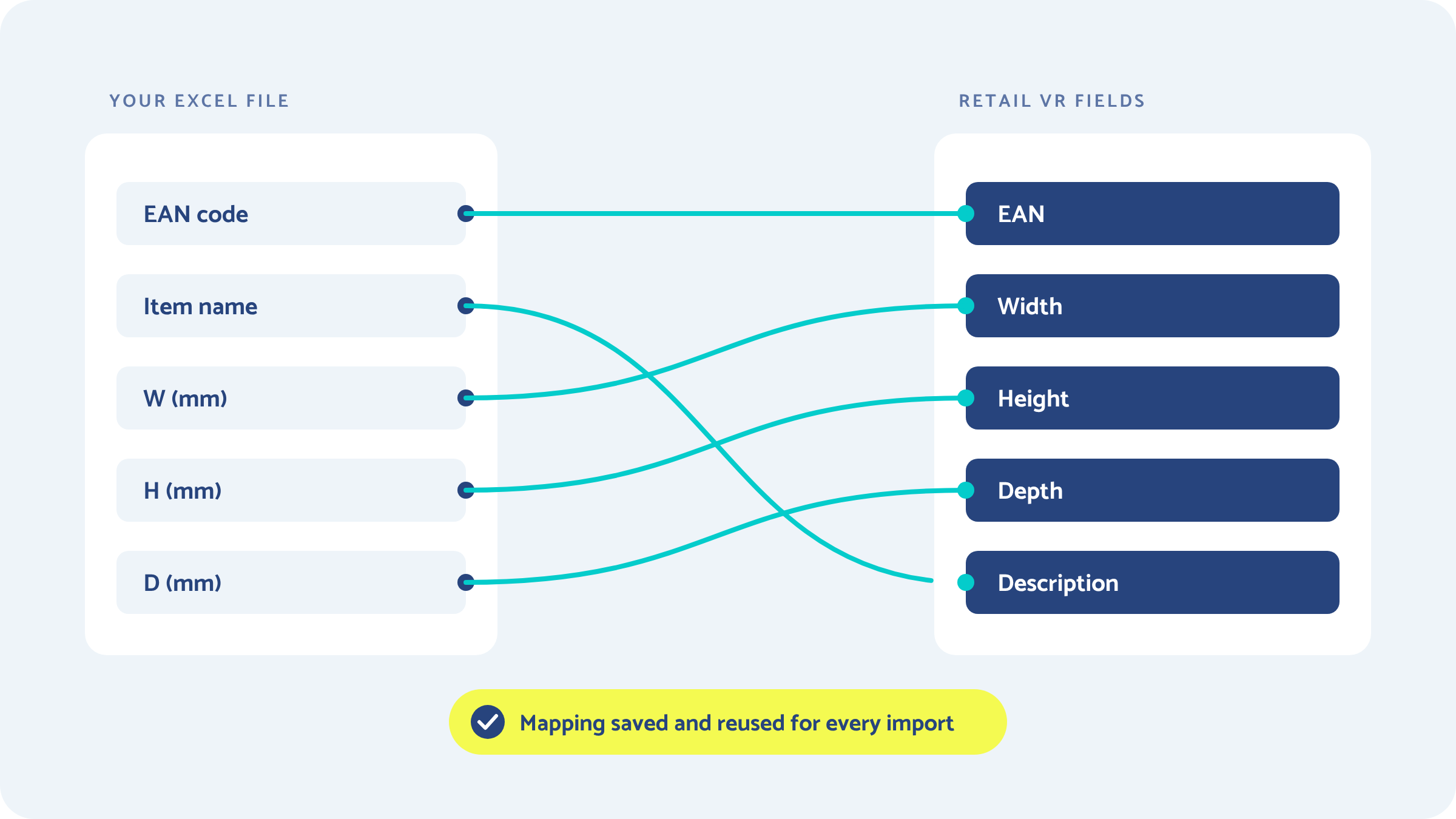
Our answer: an import that doesn't require you to reformat your files. You map each column to a field once (EAN, width, height, depth, description, category), and that mapping is reused for every future import. Your exports keep their usual shape: the tool adapts, not you.
Bring over what you already have: planograms, 3D models and architectural plans
The real obstacle to getting a project started isn't the tool; it's migrating everything that already exists.
A retailer switching solutions owns hundreds of planograms, often created in Blue Yonder Space Planning or NielsenIQ Spaceman. A brand works with agencies that model its fixtures and POS displays in their own software. The store construction team keeps store plans in AutoCAD. Retail VR accepts these formats as they are:
.psa and .pln files are the native formats of the two long-established space planning tools, as the Blue Yonder documentation points out: accepting them means taking over an entire planogram library without redrawing it. On the 3D side, glTF and its binary version GLB have become the exchange standard.

This openness also changes how you work with partner agencies. A POS designer in Blender or 3ds Max, a retail architecture agency delivering its plans in DWG: everyone keeps their own tools, and the platform brings their deliverables together in the same 3D merchandising concept, which both brand and retailer can review.
Our view: data first, 3D second
A successful integration isn't measured by the number of connectors, but by the number of manual re-entries it removes.
- An API won't fix a poorly maintained PIM. If the dimensions are wrong at the source, the 3D planogram will be wrong, just faster. Connecting the platform is often the opportunity to clean up product data.
- Start an integration project small. One category, one data flow, one contact in IT and one in merchandising. Measure the time saved, then expand. Trying to connect everything in the first month is the surest way to connect nothing.
- Connected data prepares the next step. AI can only build and adapt planograms from up-to-date data.
That is the whole point of our work on AI: cutting the time spent on operational production to give time back to analysis and decision-making. We described that direction in our article on generative AI applied to planograms. Integration with your IT systems is its foundation.
At scale, every re-entry multiplies
The larger the network, the higher the cost of data that doesn't flow properly. Two of our clients show the scale at which layouts must be rolled out and kept up to date.
In a network that size, the same product data is used thousands of times: for the planogram, the merchandising book, field instructions and replenishment. Entering it once, at the source, is a condition of reliability. It is also what speeds up a product launch in mass retail, where every day saved between the product record and the shelf counts.
7 questions to ask before choosing merchandising software
Before comparing 3D renderings, check how the tool fits into your IT stack. Here are the questions we recommend asking every vendor, including us.
- What data can the tool read through its API, and what can it send back?
- Can it connect to our current PIM, DAM and ERP, and how (existing connector or custom integration)?
- Does authentication go through our company SSO?
- Can we import our files without reformatting them, using configurable mapping?
- Can existing planograms (.psa, .pln) be taken over without being redrawn?
- Which 3D and CAD formats are accepted for working with our agencies?
- Can planogram data (minimum display quantity, maximum shelf stock) feed our supply chain automatically?
Frequently asked questions
What does integrating merchandising software with IT systems mean?
It is the tool's ability to exchange data automatically with the company's existing systems: PIM for product information, DAM for images, ERP for assortment, supply chain tools for replenishment, and the directory for access. It removes manual re-entry and ensures planograms are built on up-to-date data.
Why connect planogram software to a PIM?
The PIM already contains the dimensions, EANs and attributes of every product. Connecting it avoids re-entering that information, reduces the dimension errors that distort layouts, and lets 3D products be created automatically as soon as they are added to the master data.
Can planograms created in Blue Yonder or Spaceman be taken over?
Yes. Retail VR accepts .psa files (Blue Yonder Space Planning) and .pln files (NielsenIQ Spaceman). A retailer or brand can take over its existing planograms without redrawing them, then view and develop them in 3D.
Which 3D formats are compatible with Retail VR?
The platform accepts GLB, glTF and FBX (Blender, 3ds Max, Maya, SketchUp, Spline), as well as DXF and DWG architectural plans from AutoCAD. Partner agencies can deliver their models in the formats they already use.
Do you need an API to use Retail VR?
No. The API is recommended to automate recurring data flows, but the platform stays open to manual imports. With configurable mapping, your Excel or CSV files are imported without reformatting, so you can start a pilot quickly before automating the exchanges.
Next step
The best way to find out whether a platform will fit into your IT stack is to start from your real data flows: which systems, which formats, which category to begin with.

.webp)
.webp)
.webp)
